Free Word template
Half-Sheet Announcements
A half-sheet is the insert that falls out of the bulletin into someone's lap, which is exactly why people read it. This template puts two copies of the same announcement on one sheet of letter paper. Print, cut down the middle, and you have twice as many inserts from the same paper.
Clicking the button saves half-sheet-announcements.docx (a Word document, 7 KB) to your Downloads folder. No sign-up, no email address.
- PaperUS Letter, landscape. Cuts into two 5½ × 8½ halves.
- PrintingOne sheet, one side, cut in half
- In the file1 page
- Opens inWord, Google Docs, LibreOffice
What it looks like
What's in it
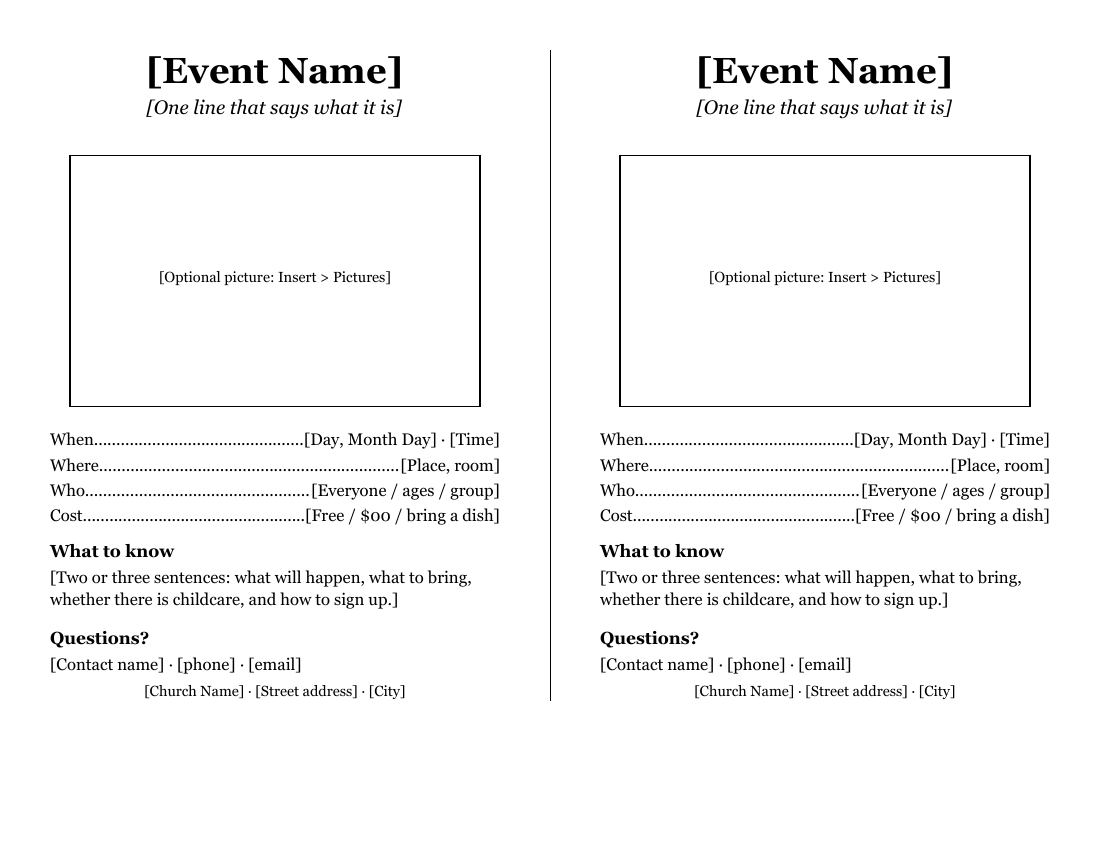
Each half has the event name in large type, a line saying what it is, a box for a picture, and four lines with dotted leaders: When, Where, Who and Cost. Below are "What to know" and "Questions?" for the details and a contact, and your church's name and address at the bottom. A thin line down the middle marks where to cut.
The same layout works for a potluck, a blood drive, a Vacation Bible School sign-up, a choir call for new voices, or a club's next meeting. It also makes a good small poster for a bulletin board.
Fill it in with Word
Both halves are the same, so fill in the left one first. Then copy it to the right:
- Click at the very start of the left half, hold Shift, and click at the end of the address line at the bottom of it.
- Copy (Ctrl+C, or Command+C on a Mac).
- Select the right half the same way and paste (Ctrl+V, or Command+V on a Mac) over it.
If the right half jumps onto a second page, the left half is a line too long. Shorten "What to know" or make the picture box smaller, then try again.
Say the date the way people say it: "Sunday, November 15", not "11/15". Put the most important fact (the date) on the first line under the picture, where it already sits.
To find anything you missed, use Word's search box (Ctrl+F on Windows, Command+F on a Mac; Microsoft's list of Word shortcuts) and type a single [. Word jumps to every bracket still in the document. When the search finds nothing, you're done.
Open it in Google Docs or LibreOffice
Upload the .docx to Google Drive (New > File upload) and open it in Google Docs (Google: work with Office files). The two halves are columns; if the right half moves, Google's column help shows where the column break lives. The thin cutting line is a Word column setting and may not show in Google Docs; fold the sheet in half to find the middle instead.
LibreOffice Writer opens it with File > Open, cutting line included.
Print and cut it
Print on one side. One sheet gives you two announcements, so for 120 inserts, print 60 sheets.
Cut down the center line with a paper cutter, or fold each sheet in half, crease it firmly, and tear along the fold for a soft edge. A paper cutter can take a small stack at a time.
For a brighter insert, print on pastel paper. Keep the color light so the black type stays easy to read.
Related help
More templates
- Folded Sunday Bulletin2 pages
- Large-Print Order of Worship2 pages
- Monthly Church Newsletter2 pages
- Funeral or Memorial Service Program2 pages
- Wedding Program2 pages
- Concert or Event Program2 pages
- Prayer List2 pages
- Club Newsletter2 pages
- Family Cookbook Recipe Pages4 pages